
Open your medicine cabinet. 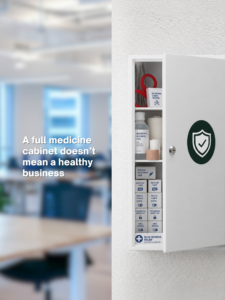
There’s a good chance you’ll find a little bit of everything.
Cold medicine from last winter.
A bottle of vitamins you forgot you bought.
Half-used cough syrup.
Bandages.
Maybe even something that expired two years ago.
There’s plenty in there.
But nobody looks at a packed medicine cabinet and says:
“Wow. I must be incredibly healthy.”
Cybersecurity can work the same way.
Over the years, businesses collect security tools.
One gets added because of a new threat.
Another gets purchased because the cyber insurance company asked for it.
A vendor recommends something else.
Then somebody hears about a new security product and decides the company probably needs that too.
Before long, you have a whole cabinet full of cybersecurity.
But here’s the question Raleigh and Greensboro business owners should be asking:
Is all of it actually working together to protect the business?
Because owning more security products isn’t the same as having better IT Security.
The Cybersecurity Myth: More Tools Must Mean Better Protection
It’s an understandable assumption.
If one security tool makes your business safer, adding another should make it even safer.
Right?
Sometimes.
Layered security is important. Different safeguards can protect against different threats.
But adding technology without understanding how it fits into your overall security strategy can also create complexity, duplicate protection, and potentially leave gaps nobody realizes are there.
You might have email security.
Endpoint protection.
Multi-factor authentication.
Backups.
A firewall.
Security awareness training.
Monitoring software.
All of those things can serve an important purpose.
But who is making sure they’re configured correctly?
Who is monitoring the alerts?
Who knows where one system’s responsibility ends and another begins?
And who is looking at the entire picture?
That’s where the difference between having cybersecurity products and having a cybersecurity strategy becomes important.
Healthy IT Security Works Like a System
Your immune system doesn’t rely on one thing to keep you healthy.
Different parts work together.
Your cybersecurity should operate the same way.
Technology protects your systems.
Monitoring helps identify suspicious activity.
Employees learn how to recognize potential threats.
Access controls determine who can reach sensitive information.
Backups help you recover if something goes wrong.
Processes tell employees what to do when they see something suspicious.
And your IT support team helps keep those pieces working.
Each part has a job.
But the real strength comes from coordination.
If you keep adding individual products without stepping back to look at the whole system, you may end up spending more without necessarily becoming more secure.
Four Questions Every Raleigh and Greensboro Business Should Ask About Cybersecurity
You don’t need to understand every technical detail behind every security product.
That’s not your job.
But you should be able to get clear answers to four questions.
1. What Security Tools Are We Paying For—and Why?
Start with the basics.
What do you actually have?
And what does each tool do?
Someone—whether that’s an internal technology employee or your managed IT provider—should be able to explain your major security protections in plain English.
Not:
“This is our next-generation cloud-enabled endpoint detection platform.”
Try:
“This monitors your computers for suspicious activity, and here’s what happens when it finds something.”
Much better.
If nobody can explain why you’re paying for a particular tool, that’s worth investigating.
The goal isn’t necessarily to eliminate products.
It’s to understand what you’re buying and what problem each one solves.
2. Where Are We Duplicating Protection—and Where Are We Missing It?
Overlap isn’t automatically bad.
Sometimes it’s intentional.
You may want multiple layers protecting particularly important systems.
The problem is accidental overlap.
You don’t want to discover you’re paying two vendors to solve essentially the same problem while another important risk isn’t being addressed at all.
That’s why cybersecurity needs to be evaluated as part of your broader business technology environment.
Look at the whole picture.
What are you protecting?
Which tools protect it?
Where do responsibilities overlap?
And what’s falling through the cracks?
Those answers are much more useful than simply counting how many security products you own.
3. Who Is Actually Watching Everything?
This may be the most important question.
Security software can generate alerts all day long.
That’s great.
But what happens to those alerts?
Does someone review them?
Does someone determine what’s serious?
Does someone know what action should be taken?
Does someone follow up?
Technology without accountability creates a false sense of security.
It’s a little like installing a burglar alarm that makes noise in an empty building.
The alarm worked.
But nobody did anything about it.
Your business should know exactly who is responsible for monitoring security and what happens when something unusual is detected.
Good managed IT services in Raleigh or managed IT services in Greensboro should give you a clear answer.
4. Does Our Cybersecurity Still Fit the Business We Have Today?
Businesses change faster than their technology plans sometimes do.
Think about how different your company may be from two or three years ago.
You’ve hired employees.
People have left.
You’ve adopted cloud software.
Employees may work remotely.
You’ve added vendors.
You’ve replaced computers.
You’ve taken on larger customers.
Maybe you’ve opened another location.
Every one of those changes can affect your technology and security needs.
That’s why cybersecurity reviews should go hand in hand with technology lifecycle management.
The laptop that was perfectly fine several years ago may be approaching replacement.
Software that once fit your needs may no longer be supported.
An old server may be creating reliability concerns.
User accounts that were once necessary may no longer be needed.
Regular computer upgrades and technology reviews help make sure the environment you’re protecting is still appropriate for the business you’re operating.
Don’t Forget the People Behind the Technology
There’s another part of your cybersecurity system that’s easy to overlook.
Your employees.
You can invest in sophisticated security tools, but your people still receive emails.
They still approve payments.
They still create passwords.
They still share files.
They still decide whether an unusual request looks legitimate.
That’s why employee security awareness belongs in the same conversation as firewalls and antivirus software.
Your employees don’t need to become cybersecurity experts.
They need to know what normal looks like.
They need to recognize when something feels unusual.
And most importantly, they need to know exactly what to do next.
Technology can block a lot.
Good habits can catch some of what gets through.
Where Managed IT Services Fit Into the Picture
This is where a proactive technology partner can provide real value.
Good managed IT services in Raleigh and managed IT services in Greensboro shouldn’t be about piling more products onto your business.
They should help you understand the technology you already have.
A strong IT partner should be able to explain what’s protecting your business, where security gaps may exist, which tools overlap, who is monitoring them, and whether your security strategy still matches your current operations.
That conversation may include:
- IT Security and cybersecurity monitoring
- Employee security awareness
- Backup and disaster recovery
- Day-to-day IT support
- Access and account management
- Computer upgrades
- Technology lifecycle management
- Business technology planning
The goal isn’t having the longest list of cybersecurity tools.
It’s making sure the right protections are in the right places—and somebody is paying attention.
Give Your Business Technology a Checkup
Most business owners don’t want another cybersecurity product.
They want confidence.
Confidence that their business is protected.
Confidence that somebody is monitoring what matters.
Confidence that employees know what to do.
Confidence that backups will be there if something goes wrong.
And confidence that the money they’re spending on technology is actually solving the right problems.
You don’t get that confidence by filling the medicine cabinet.
You get it by stepping back and looking at the whole system.
So this Cybersecurity Awareness Month, don’t ask:
“What security product should we buy next?”
Start with a better question:
“Does everything we already have actually work together?”
The answer may save you money.
More importantly, it may uncover the gap nobody knew was there.
Book a short discovery call here. We’ll take a closer look at your Raleigh or Greensboro business technology, identify potential gaps and overlap, and talk about how proactive IT support, managed IT services, and technology lifecycle management can create a simpler, more coordinated approach to protecting your business.
Frequently Asked Questions About IT Security for Raleigh and Greensboro Businesses
Do more cybersecurity tools make my business more secure?
Not automatically. Multiple layers of protection can be valuable when each one addresses a specific risk and the tools work together. Simply adding products without reviewing overlap, configuration, monitoring, and gaps can create unnecessary complexity without solving the underlying security problem.
What should an IT Security strategy include?
An IT Security strategy may include email security, endpoint protection, multi-factor authentication, access controls, backups, monitoring, employee awareness, patching, and incident response procedures. The specific safeguards should reflect the systems, information, employees, and risks of the individual business.
What are managed IT services in Raleigh?
Managed IT services Raleigh typically refers to ongoing technology management for Raleigh-area businesses. Depending on the provider and agreement, services can include proactive monitoring, cybersecurity, help desk support, backups, patch management, technology planning, vendor coordination, and technology lifecycle management.
What are managed IT services in Greensboro?
Managed IT services Greensboro generally provide Greensboro-area businesses with ongoing IT management and support rather than relying only on help when something breaks. Services may include IT Security, system monitoring, backups, help desk support, maintenance, cybersecurity guidance, and strategic technology planning.
How do I know whether we’re paying for duplicate cybersecurity tools?
Start by creating an inventory of your security products and identifying what each one is supposed to accomplish. Your IT provider should be able to explain where protections intentionally overlap, where you’re paying for duplicate capabilities, and where gaps may exist.
Who should monitor our cybersecurity tools?
Your business should have clearly assigned responsibility for monitoring security systems and responding to alerts. That could be an internal IT team, an outside provider, or a combination of both. What’s important is knowing who owns the outcome when suspicious activity is detected.
How often should our business review its cybersecurity strategy?
The source recommends reevaluating cybersecurity as the business changes rather than assuming protections that made sense when first implemented still fit today. New employees, departures, applications, and changing work practices can all affect what protections are appropriate.
What does technology lifecycle management have to do with cybersecurity?
Technology lifecycle management helps businesses track hardware and software as they age. This makes it easier to identify systems approaching replacement or support changes and plan upgrades before aging technology becomes an operational concern.
How do computer upgrades fit into an IT strategy?
Computer upgrades should be planned as part of your broader business technology strategy. Instead of waiting for devices to become unreliable, lifecycle planning allows you to identify aging equipment, budget for replacements, and schedule upgrades with less disruption.
What’s the difference between IT support and managed IT services?
Traditional IT support often focuses on resolving individual technology problems. Managed IT services can take a broader approach that includes ongoing monitoring, maintenance, cybersecurity, backups, lifecycle management, planning, and proactive support in addition to troubleshooting.
Why does employee cybersecurity training matter if we already have security software?
Security software cannot make every decision for an employee. People still receive emails, approve requests, share information, and interact with business systems. Training helps employees recognize suspicious behavior and understand what to do when something doesn’t look right.
How can I tell whether my Raleigh or Greensboro business has cybersecurity gaps?
Start by asking four questions: What security protections do we currently use and why? Where do they overlap or leave gaps? Who is responsible for monitoring them? And when were our needs last reevaluated? Those questions mirror the cybersecurity “check-up” recommended in the original source.
Does Your Cybersecurity Need a Checkup?
You may not need another security product.
You may simply need a clearer picture of what you already have.
If you’re unsure whether your IT Security tools are working together, whether you’re paying for unnecessary overlap, whether aging equipment needs computer upgrades, or whether anyone is actively monitoring the whole environment, it’s worth finding out.
Book a short discovery call here. We’ll take a closer look at your Raleigh or Greensboro business technology, identify potential gaps and overlap, and talk about how proactive IT support, managed IT services, and technology lifecycle management can create a simpler, more coordinated approach to protecting your business.