
Here’s How to Actually Use It (Without Wrecking Anything) 
It’s February. The “new year, new systems” buzz is already fading. Your inbox is still overflowing, meetings are multiplying, and your team’s stretched thin.
Meanwhile, every tool you open is shouting:
“Add AI! Automate now! Use AI or fall behind!”
Okay—but how, exactly?
For small business owners in Raleigh, Durham, and Greensboro NC, it’s not about adding robots to everything. It’s about using AI to save time without causing a data breach, confusing your team, or making a mess you can’t clean up.
Let’s break it down.
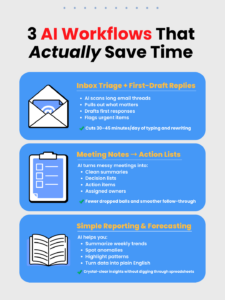
✅ 3 Ways Small Businesses Can Use AI That Actually Save Time
1. Inbox Help: Draft Replies + Prioritize What Matters
AI won’t replace your judgment, but it can help you sort through the mess.
Use it to:
-
Summarize long threads
-
Draft first-pass responses
-
Flag high-priority emails
💡 One small professional services firm started using AI to reply to routine client questions—appointment scheduling, document requests, updates. The owner saved 30–45 minutes a day. That’s over 10 hours a month back.
Keep in mind: Let AI write the draft. You give the final okay. Don’t hit send without reading it first.
2. Turn Meetings Into Action Items
AI note tools are like that one employee who actually listens and takes good notes.
Use them to:
-
Recap key points
-
List decisions and follow-ups
-
Assign tasks to the right people
No more “Wait, what did we decide last Tuesday?”
If your team does regular check-ins, status updates, or client calls, this is a no-brainer.
3. Simplify Reports and Spot Trends
Small businesses usually have data—they just don’t have time to dig through it.
AI can:
-
Pull sales highlights
-
Flag anything unusual
-
Forecast inventory needs
-
Turn raw numbers into plain-English summaries
It won’t make business decisions for you. But it will give you a head start, so you’re not buried in spreadsheets all weekend.
🛑 5 Guardrails to Keep AI from Getting You in Trouble
This is where most businesses mess up. They treat AI like Google—typing in sensitive stuff without thinking twice.
Here’s how to stay smart:
🚫 Rule #1: Don’t Paste Sensitive Info
No customer data. No payroll details. No health records. No passwords.
If you wouldn’t put it on a billboard, don’t paste it into ChatGPT.
🔐 Rule #2: Control Who Uses What
Employees mean well—but when they sign up for random AI tools using company data, things get risky fast.
Fix it with:
-
A short “approved tools” list
-
Clear guidelines on what data is okay to use
-
Extra limits for roles like HR, finance, or legal
🧠 Rule #3: AI Writes, Humans Approve
AI is good at sounding confident—even when it’s wrong.
Everything that leaves your business with your name on it should be reviewed by a human.
📦 Rule #4: Assume It’s Being Stored
Even if the tool says “we don’t train on your data,” your input is sitting on someone’s server. Treat everything you enter like it’s permanent.
❓ Rule #5: Make It Safe to Ask
If someone on your team isn’t sure whether something’s safe to share, they should feel comfortable asking. Don’t create a culture where people guess.
Five rules. Simple enough to remember. Strong enough to prevent most AI mistakes.
💼 What This Looks Like in Real Life
You don’t need a giant “AI strategy.”
You need this:
-
Choose one or two spots where your team’s losing time.
-
Add AI with guardrails.
-
See how it goes.
-
Adjust as needed.
That’s it.
The smartest businesses right now aren’t the ones chasing every shiny AI tool. They’re the ones using it intentionally and protecting what matters.
🧑💻 How an IT Partner (Like an MSP) Helps You Use AI Without the Headaches
Let’s be honest—you’re busy. You don’t have time to research 50 apps, write a usage policy, or guess whether your data is at risk.
That’s where a Managed IT partner comes in.
A good MSP can:
✔️ Recommend tools that fit your business and industry
✔️ Set access limits so sensitive info stays protected
✔️ Write an AI use policy your team can actually follow
✔️ Integrate tools into your workflow (so it helps, not adds work)
✔️ Monitor for “shadow AI” use before it becomes a problem
So AI works for you—not the other way around.
🕵️♀️ Where’s Your Business Right Now?
If you’ve already got AI rules in place and your team knows what’s safe to share? Awesome. You’re ahead of the curve.
If you’re not sure what your team is pasting into AI tools right now? That’s worth checking—before something confidential ends up somewhere it shouldn’t.
And if you’ve got a business-owning friend trying to “figure out AI,” send them this blog. It might save them a lot of stress (and possibly a lawsuit).
👉 Book a 10-minute AI Safety Check Call Here
We’ll help you set guardrails, choose smart tools, and protect your data while still saving time.
Because AI isn’t going anywhere. The question is—are you using it safely?
FAQs About Using AI in Small Businesses
What are the easiest ways for a small business to start using AI?
The easiest places to start are everyday tasks that consume time. Many small businesses use AI to draft email replies, summarize meetings, create action lists from discussions, and simplify reports or data analysis. Starting with one or two simple uses helps your team save time without disrupting workflows.
Is it safe for employees to use AI tools like ChatGPT at work?
AI tools can be safe if used properly, but businesses should set clear guidelines. Employees should never paste sensitive information such as customer data, payroll details, passwords, or confidential documents into AI tools. Establishing an approved list of tools and a simple AI use policy helps prevent mistakes.
Can AI replace employees in small businesses?
No. AI works best as a productivity assistant, not a replacement. It can draft emails, summarize information, and analyze data quickly, but human judgment is still needed to review outputs, make decisions, and communicate with customers.
What kind of business tasks can AI automate?
AI is especially useful for tasks like:
-
Drafting routine email responses
-
Summarizing long documents or meeting notes
-
Creating action items and task lists
-
Analyzing reports and spotting trends
-
Generating first drafts of content
These types of tasks can save employees hours every week.
What data should never be shared with AI tools?
Businesses should avoid entering any confidential or sensitive information into AI tools. This includes customer records, financial information, employee data, health records, login credentials, and proprietary business information.
Why do businesses need an AI use policy?
An AI use policy helps employees understand which tools are approved, what data is safe to use, and how AI should fit into daily work. Without guidelines, employees may unknowingly expose sensitive information or rely on AI output without verification.
How can a Managed IT provider help businesses use AI safely?
A Managed IT provider can help businesses adopt AI tools securely by recommending safe platforms, setting access controls, creating AI usage policies, and monitoring for unauthorized AI tools. This allows businesses to benefit from AI while protecting sensitive data.
Should every business implement AI right away?
Not necessarily. The best approach is to start small. Identify one or two areas where your team loses time, add AI to help with those tasks, and measure the results. This gradual approach helps businesses gain efficiency without creating unnecessary risk.